


The Best Apps for Property Maps and Property Lines (Pins, Boundaries, Photos, and Notes)
Mapping a property used to mean hand-drawn sketches, buried folders of photos, or trying to remember where something was last time it broke. Today, modern property mapping apps let you document everything digitally, right on a map.
But not all mapping apps are created equal.
Some are designed for hiking. Some are meant for engineers. Others are simple drawing tools that fall apart once a property gets complex. Below is a clear breakdown of the best apps for creating detailed property maps, including pins, lines, notes, photos, and collaboration.
What to Look for in a Property Mapping App
Before choosing a tool, it helps to understand what actually matters for real properties:
- GPS based pins that stay accurate over time
- Lines and areas for pipes, zones, boundaries, and features
- Photos and notes attached directly to map features
- Mobile and desktop access
- Easy sharing with family, crews, or vendors
- Long term organization, not just quick sketches
With that in mind, here are the top options.
Best Overall Property Mapping App
YardPro
Best for: Homeowners, estates, landscapers, HOAs, golf courses
YardPro is built specifically for mapping and managing real properties. Instead of just dropping pins, it lets you create a living map of everything that matters.
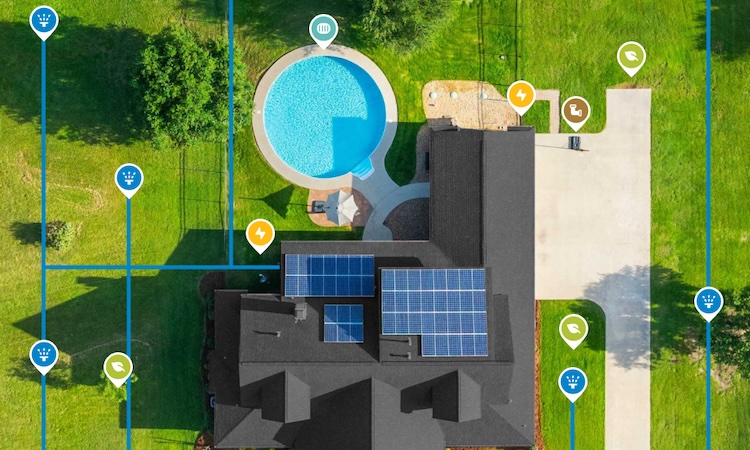
You can map irrigation lines, valves, sprinklers, drains, trees, utilities, and other assets using GPS pins, lines, and areas. Each map feature can include photos, notes, and task history so information is never lost.
Unlike generic mapping tools, YardPro is designed for long-term use. Whether you are troubleshooting a leak, planning a project, or handing off information to a contractor, everything stays organized and easy to find.
Why it stands out
- Pins, lines, and areas with photos and notes
- Built for maintenance, not exploration
- Mobile and desktop access
- Easy collaboration with others
- Designed to be useful years later
Best Free Custom Map Tool
Google My Maps
Best for: Simple, free custom maps
Google My Maps allows you to create custom maps with pins, lines, and polygons. You can add notes and photos and share the map with others.
It is a solid starting point for small projects or one-time documentation. However, it lacks structure, workflows, and long-term organization. As properties grow more complex, maps often become cluttered and hard to maintain.
Good for
- Free and easy to use
- Simple sharing
Limitations
- Weak mobile experience
- No task tracking or history
- Easy to outgrow
- Not designed for field work
Best for Large Land and Property Boundaries
onX
Best for: Large parcels, boundaries, access planning
onX excels at showing property boundaries, parcel data, and navigation on large pieces of land. It is widely used for hunting, off-road navigation, and rural properties.
While GPS accuracy is excellent, it is not designed for managing infrastructure like irrigation systems or utilities.
Best use
- Understanding land boundaries
- Navigating large properties
Best Professional GIS Option
Esri (ArcGIS)
Best for: Engineers, municipalities, surveyors
ArcGIS is the industry standard for GIS mapping. It is extremely powerful and supports advanced layers, data models, and analysis.
For most property owners and maintenance teams, it is far more complex and expensive than necessary.
Use this if
- You need full GIS capabilities
- You have trained staff managing maps
Best for Simple GPS Photo Documentation
Map Marker
Best for: Quick GPS tagged photos
These apps allow you to take photos with GPS coordinates and view them on a map. They are useful for quick documentation but offer little structure.
Limitations
- No collaboration
- No long term organization
- Not designed for asset management
Apps That Show Property Lines on an Aerial Map
Many people searching for a property mapping app want one specific thing: to see property lines over an aerial photo. These apps work in two different ways, and the right choice depends on which kind of line you actually need.
1. Parcel data apps. Tools like LandGlide and OnX overlay approximate parcel lines from county records on a satellite map. They are fast for a rough answer, like checking which side of a fence a tree sits on. The tradeoff is accuracy: county GIS lines are commonly off by several feet, and no app can legally establish a boundary. Only a licensed survey can do that.
2. GPS drawing apps. Tools like YardPro let you draw and mark your own lines directly on the aerial view, or walk the property and drop GPS points as you go. This is the right kind of app when the line you care about is not a legal boundary at all: an irrigation main, a buried utility, a drainage run, a planned fence, or the maintained edge of a large property. If you already have survey coordinates, you can plot them so the boundary lives on the same map as everything else.
Can an app show my exact property lines? Parcel apps show approximate lines from county records, which is fine for orientation. For anything that depends on the exact boundary, start from a recorded survey, then recreate those corners in a GPS mapping app so the trusted line is on the map you use every day.
What about plat maps? A plat map is the recorded drawing of parcel boundaries. Parcel apps display a digitized version of it. A practical workflow: keep a photo of the plat attached to your property map, recreate the key lines over the aerial view, and keep boundary, utility, and irrigation lines together in one place instead of across three apps and a filing cabinet.
For a broader comparison that includes field and turf tools, see our guide to the best yard mapping tools of 2026.
Final Thoughts
Most property owners start with simple mapping tools and eventually hit the same wall. Photos get lost. Notes are scattered. Contractors change. Time passes.
If your map needs to be useful after today, choose a platform designed for property ownership and maintenance, not exploration or one-off projects.
A well-built property map saves time, prevents costly mistakes, and gives you confidence that critical information is always at your fingertips.