



How to Map a Vineyard with YardPro
When You Take Over a Vineyard, You Inherit Its Mysteries
When our team took over management of a winery, the documentation handed over was a folded paper map with minimal detail, a conversation with the previous owner, and orange cones sitting on top of stakes in the ground to show where one grape variety ended and another began.
That is not unusual. Most vineyards run on a combination of institutional memory, informal markings, and the assumption that whoever planted the vines still works there. When that assumption breaks down, so does everything else.
Knowing exactly what you have, where it is, and how it all connects is the foundation of running a vineyard efficiently. And until recently, most vineyard managers had no good way to document that at scale.
That is where YardPro's Area tool changes the game.
What the Area Tool Actually Does
The Area tool in YardPro lets you draw a polygon directly on a satellite map of your property. You zoom in as tight as you need, tap to place your corners, and adjust each point until the boundary matches exactly what is on the ground. There is no GPS walking required and no special equipment. You do it from the app or the web, at your desk or in the field.
Once you close the polygon, YardPro automatically calculates the acreage and square footage of that area. You will see it displayed right in the Area details panel. For example, 633,878 square feet, or 14.55 acres. No math, no estimation, no measuring wheel.
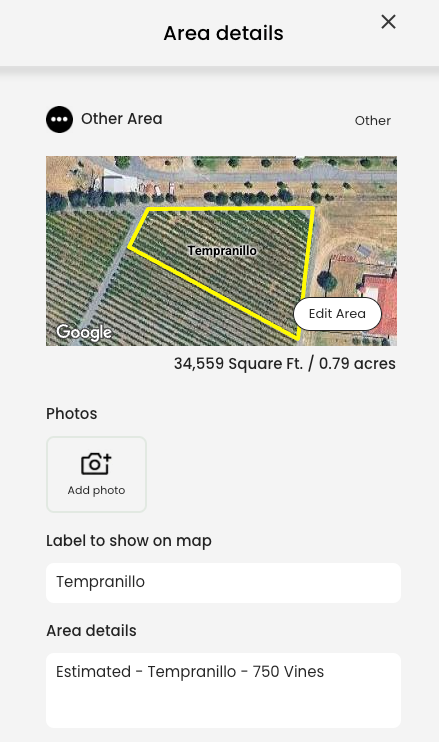
From there, you can give the area a label that shows directly on the map, add notes in the details field, attach photos, assign a color, and associate it with an irrigation zone. Everything you need to know about that block lives in one place.
Mapping Your Grape Varieties by Block
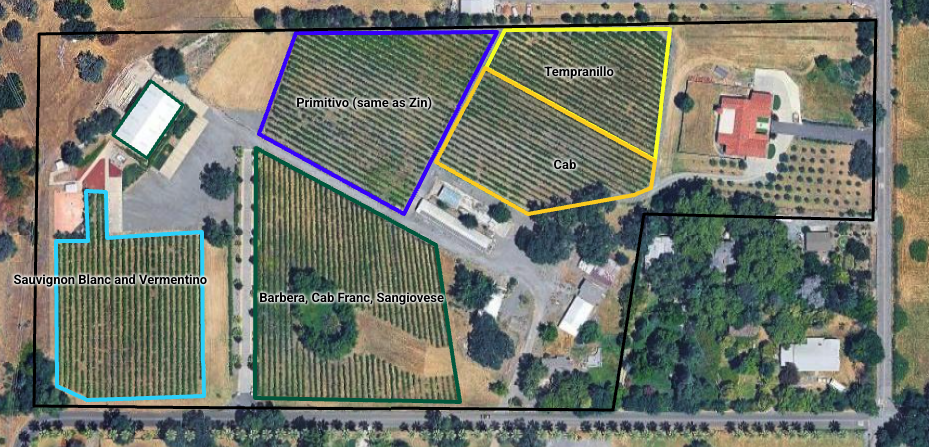
One of the most immediately useful applications for a vineyard is mapping each grape variety as its own area. You draw a polygon around the Cabernet block, label it, and give it a color. Then you do the same for Tempranillo, Primitivo, Barbera, Cab Franc, Sangiovese, Sauvignon Blanc, and every other variety on the property.
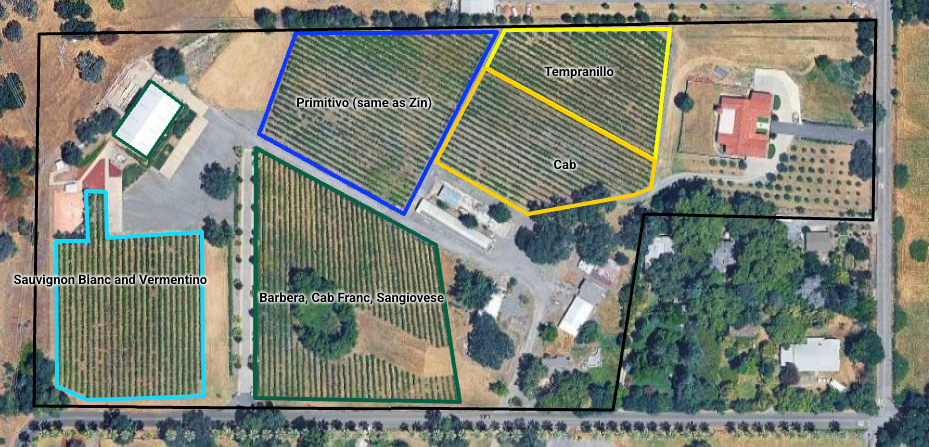
The result is a color-coded map of your entire vineyard that anyone on your team can read at a glance. No more cones on stakes. No more asking someone who has been there for fifteen years. New employees, seasonal crews, and outside contractors all start with the same complete picture from day one.
Because the labels display directly on the satellite map, you can visually confirm which varieties are planted where, how large each block is, and how the blocks relate to each other across the property, all without leaving the app.
Understanding Your Irrigation by Zone and Block
Vineyards almost universally use drip irrigation, and drip systems have a way of becoming difficult to trace over time. Lines get added, zones get split, and the original layout becomes a puzzle that only one or two people can solve.
YardPro lets you map your irrigation lines directly on top of your area map. You can draw the main supply lines separately from the drip laterals, and assign each line to a specific zone. The zones are color-coded, so you can see at a glance which irrigation zone serves which grape block.
This matters more than it might seem. When a zone stops performing correctly, you need to know immediately which block is affected, how many acres are involved, and where to start troubleshooting. With a layered map showing both your variety blocks and your irrigation zones, that answer is visible in seconds rather than minutes or hours.
It also makes conversations with irrigation contractors faster and more productive. Instead of walking the property to explain what you have, you share the map.
Acreage You Can Actually Trust
Knowing the precise acreage of each variety block matters for a long list of reasons: yield estimation, water budgeting, spray and fertilizer calculations, harvest planning, and compliance reporting, among others.
When you draw an area in YardPro, the square footage and acreage calculate automatically based on the polygon you draw on the satellite map. You are not estimating from property records that may not reflect how the vines are actually laid out. You are measuring what is actually there, at the precision level you need.
As your vineyard changes over time (replants, new blocks, row removals) you update the map and the acreage updates with it. Your documentation stays current without a separate calculation step.
Adding Tasks to Keep Work Moving
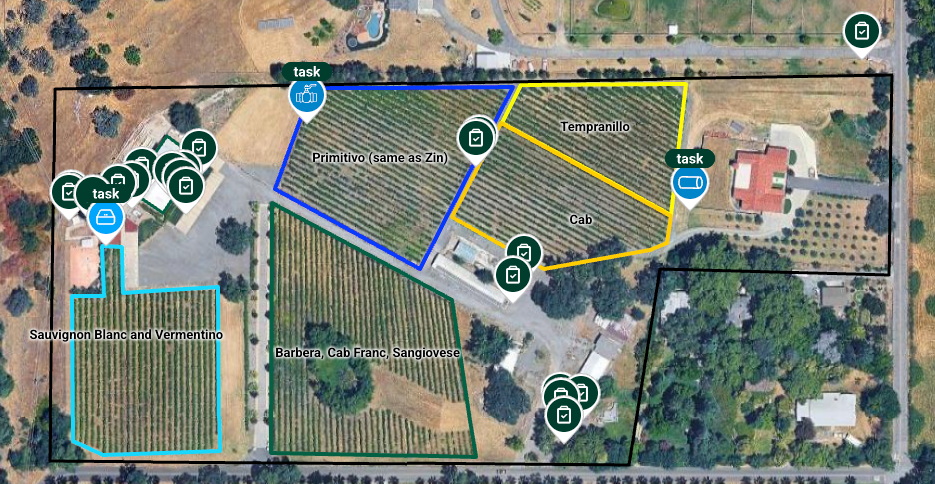
YardPro also lets you drop task markers anywhere on the map. You can place a task pin directly within a grape block, assign it to a crew member, add a due date, and include whatever notes are relevant. Pruning schedules, trellis repairs, irrigation checks, cover crop management; any recurring or one-time vineyard task can be tracked this way.
Because the tasks live on the same map as your variety blocks and irrigation lines, there is no disconnect between where work needs to happen and what is actually being assigned. Your team sees the task in context, right on the property map.
The Operational Difference This Makes
A vineyard map built with YardPro's Area tool is not just a reference document. It is a living operational tool that your whole team uses every day.
When the vineyard manager walks a new employee through the property, they hand them a phone with the map open. When a drip line goes down, the team can identify which variety block and how many acres are at risk before anyone sets foot in the field. When ownership changes, or a key employee leaves, the knowledge does not walk out the door with them.
The paper map and the orange cones served their purpose. But a vineyard operating at a professional level deserves documentation that matches.
Start Mapping Your Vineyard Today
YardPro's commercial plan is built for properties like yours - unlimited markers, lines, areas, images, and team members, with full task management included.
Download the app and start your free 7-day trial today. You can have your first grape block mapped before the day is out.